The new basis of Microsoft’s partner access model, is based on GDAP: GDAP or ‘Granular Delegated Admin Privileges’ is a relatively new feature, well-known in the Microsoft Cloud Service Provider and Partner world, but it often less known to customers, although they are most impacted by this.
In this blog, we will dive into this new service and elaborate how we can significantly reduce the supply chain attack risk with some brand-new Entra features. You can learn how you can work with your partner(s) to significantly reduce the risk of supply-chain attacks instead of having to blindly trust them.
What is partner access? DAP?
Microsoft has since a long time provided a mechanism for Partners to access their customers in a straightforward manner: Microsoft DAP (Delegated Administration Privileges). From a partner perspective, this was a quite straightforward way to access and manage their customers:
- as a partner, you connected the customer through an “invitation URL” (that the customer had to accept) or simply by creating an O365 tenant for them as CSP.
- Once the partnership was established, the partner could manage the access to their customers through 2 groups: Admin Agents (users in this group are Global Administrator in the customer’s tenant) or HelpDesk Agent (with very limited privileges … and hence not often used).
- Once a user at partner-side is in the Admin Agent group, he can easily manage all customers … unfortunately with Global Admin privileges on all of them…
In this blog on AADInternals, you find a detailed description of how DAP used to work … and why you should not like it: Microsoft partners: The Good, The Bad, or The Ugly? (aadinternals.com)
The risk of a supply-chain attack through DAP, is however high … if a partner would be compromised (or even just one account in the Admin Agents group), all customers would be compromised …
How does GDAP improve this situation?
GDAP (Granular Delegated Admin Privileges) was Microsoft’s answer to this risk and allows the partner to better scope access to customers in 2 ways:
- Define roles per customer that can be assigned to the partner’s users
- Define groups that are assigned access to specific roles on a per-customer basis
So, no longer “one group who rules them all”!
In addition, the partner access is limited in time and partner & customer have to agree on a regular basis to extend the access of the partner!
Look here for more info: Granular delegated admin privileges (GDAP) introduction – Partner Center | Microsoft Learn
But wait, that’s not it! Entra comes to help!
GDAP is an significant step forward compared to DAP, but does not yet really mitigate the risks … A partner can still request a large number of roles and a compromised partner’s account can still significantly disrupt a customer’s environment.
Microsoft however has introduced 2 interesting new features that might come to help to even further mitigate the risks here:
- Cross tenant Access Settings
- New conditional access features, including granular external user types and authentication strength
How?
Use Cross-tenant-access-settings to trust your partner’s devices & MFA
With Cross-tenant access settings, you can control which inbound and outbound access you want to allow (or block) from your tenant; it allows you to control that you only want users from specific tenants to access data/apps/services in your tenant or visa-versa.
In addition, you can also decide that you trust MFA and Device-compliance status (or hybrid-join status) from other organizations. This is a big change for managing B2B access, since in the past, “requiring trusted device” through conditional access (compliant or hybrid join) was only possible within your own organization.
So, as a first step in managing the access from your partner’s user-accounts, you can decide to trust their device’s compliance status and MFA methods, provided that you have a formal agreement with your Partner(s) that their devices are indeed properly managed, monitored and secured.
Entitlement Management and Privileged Identity Management
On the partner side, access to GDAP-managed customers can be further controlled through Privileged Identity Management (just-in-time activation) and Entitlement Management.
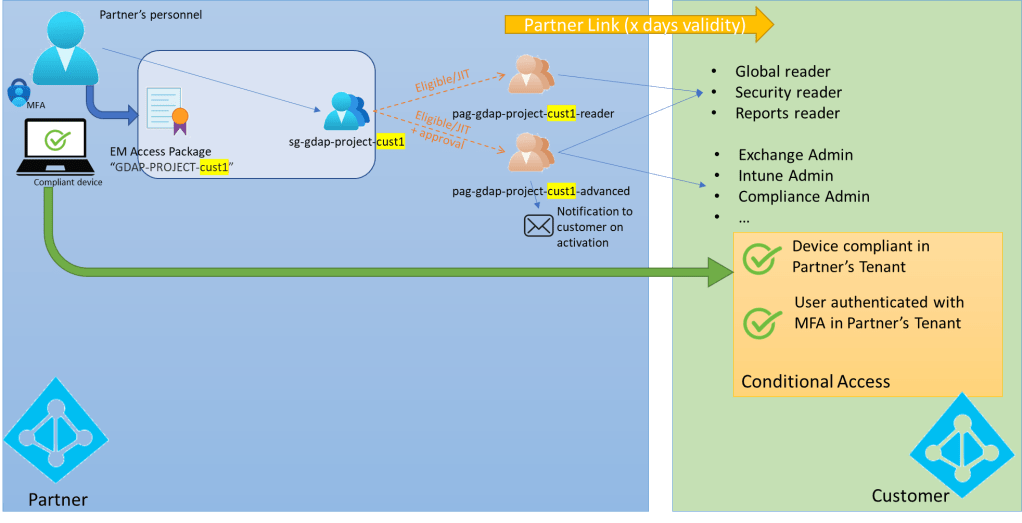
As a partner, using Entra’s Entitlement Management and Privileged Identity Management, you can create all sorts of combinations to ensure proper access management and governance is in place:
- Create Entra’s Entitlement Management Packages (with proper approval flow and access reviews) to ensure that only specific personnel can request access through GDAP and accesses are regularly reviewed, renewed and/or revoked.
- Use Entra’s Privileged Access Management to enforce the “zero standing principle” and only allow access to customer’s tenant (for a short time) after explicit activation of a privileged access group (which is assigned to a set of specific roles in on a per-customer basis)
- For high-privileged access, only allow activation of the privileged access group (and hence the linked high privileged roles for a given customer) after internal approval (on partner’s side)
- Send a notification to the customer’s security team, after activation of critical Privileged Access groups (and corresponding roles).
Of course, as a partner, you can get this even further to the next level, by integrating the mechanisms above with your ticketing system.
At SecWise (www.secwise.be), we have implemented the model described above and we are migrating all our customers to this new model. If you want to learn more about it, don’t hesitate to contact us!
 The Entra Guy
Leave a comment